NewSnippets: tell the AI about you and your company once.See how New modelClaude Sonnet 5.5 is now available.Read more
EVERY MODEL · ONE CORE · EVERY CAPABILITY · YOUR SYSTEMS

Everything your company does with AI - in one place.

Chat, documents, images, video, transcription, agents and automations, wired into the CRM, databases and email you already run - so a request ends as a finished document, a sent email or an updated record, not a chat window you copy-paste out of.

>_ StickyPrompts one login · one policy
GPT-6 Astra OpenAI GPT-6 Astra GPT-6 Astra is OpenAI's flagship model for demanding end-to-end work. 1.05M context · $10/$50 per 1M Claude Opus 5.5 Anthropic Claude Opus 5.5 Claude Opus 5.5 is Anthropic's flagship model for demanding reasoning, coding, and long-horizon agentic work, succeeding Claude Opus 5. 1M context · $4/$20 per 1M Gemini 3.1 Pro Google Gemini 3.1 Pro Preview Gemini 3.1 Pro Preview is Google’s frontier reasoning model, delivering enhanced software engineering performance, improved agentic reliability, and more efficient token usage across complex workflows. 1.05M context · $2/$12 per 1M Grok 4.7 xAI Grok 4.7 Grok 4.7 is SpaceXAI's flagship model for coding, agentic tasks, and knowledge work, succeeding Grok 4.6. 500K context · $2/$6 per 1M Mistral Large Mistral Mistral Large This is Mistral AI's flagship model, Mistral Large 2 (version `mistral-large-2407`). 128K context · $2/$6 per 1M DeepSeek V4 DeepSeek DeepSeek V4 Pro 0813 DeepSeek V4 Pro 0813 is a large-scale mixture-of-experts model from DeepSeek. 1.05M context · $0.4/$4.2 per 1M Qwen3.8 Flash Alibaba (Qwen) Qwen3.8 Flash Qwen3.8 Flash is a multimodal reasoning model from Alibaba. 1M context · $0.15/$0.47 per 1M Kimi K3 Moonshot AI Kimi K3 Kimi K3 is a 2.8T parameter open-weight multimodal reasoning model from Moonshot AI. 1.05M context · $3/$15 per 1M Chat Chat Every model in one chat window. Pick one, switch mid-conversation, or let auto-select choose for quality or speed. Documents Documents Newsletters, one-pagers and pitch decks from a template, with versions and change requests until it is right. Images Images Images from a sentence, or a photo edited with one. Any chat model can make them, so brief and picture share a thread. Video Video Text-to-video, or start from a first and last frame. Veo, Seedance, Sora and more, in 16:9 or 9:16, up to 4K. Transcription Transcription Meetings and recordings as a transcript split by speaker, then notes and action items in one more message. Agents Agents Agents with their own instructions, model, knowledge and tools such as web search and MCP. Call one with @ in a chat. Automations Automations Write the job once, set a schedule, and it runs on its own: hourly, daily, weekly or on your cron, with every run on record. Knowledge Knowledge Upload PDFs, Office files, CSVs and emails once. Answers cite the file they came from, for the members you choose. Prompt library Prompt library Prompts with {{variables}}, a model and a style, shared with your team or the whole workspace. Fill the blanks, run. Governance Governance Allow or block providers per team, redact sensitive data before any model sees it, keep data in the EU, log each redaction. Pipedrive CRM & sales Pipedrive Look up deals and contacts from a chat, and update them when you allow it. ActiveCampaign Marketing & campaigns ActiveCampaign Find contacts and lists, and add to them when you allow it. Brevo Marketing & campaigns Brevo Find contacts and lists, and add to them when you allow it. Postmark Email & calendar Postmark Send from your own domain, from a chat or a scheduled workflow. Google Drive Files & documents Google Drive Read source files and file finished documents back where they belong. Resend Email & calendar Resend Send from your own domain, from a chat or a scheduled workflow. MySQL Databases MySQL Ask in plain language, read-only by default, through your own jump host if it is private. Power BI Warehouses & BI Power BI Pull the numbers straight from the warehouse instead of a stale export. PostgreSQL Databases PostgreSQL Ask in plain language, read-only by default, through your own jump host if it is private. SQL Server Databases SQL Server Ask in plain language, read-only by default, through your own jump host if it is private.
IMAGE, VIDEO & VOICE
Veo 3.1Video generationVeo 3.1Generation models are metered exactly like chat, and sit under the same model allow-lists and audit log.Seedance 2.5Video generationSeedance 2.5Generation models are metered exactly like chat, and sit under the same model allow-lists and audit log.Wan 2.7Video generationWan 2.7Generation models are metered exactly like chat, and sit under the same model allow-lists and audit log.Gemini 3 Pro ImageImage generationGemini 3 Pro ImageGeneration models are metered exactly like chat, and sit under the same model allow-lists and audit log.Eleven Music v2Video generationEleven Music v2Generation models are metered exactly like chat, and sit under the same model allow-lists and audit log. Browse every text model, with prices and context windows
Before and after

Same Monday. Different company.

Six everyday jobs, first the way most companies do them today, then the way they get done in StickyPrompts. Each "after" is drawn from real runs in our demo workspace for Northwind, a fictional retailer: one request in, finished work out, in the systems you already run.

BEFORE 5 apps, every Friday, by hand
  1. 1 Export the open deals CRM
  2. 2 Paste them into a chatbot, ask for a summary Chatbot
  3. 3 Check the totals it got wrong by hand Spreadsheet
  4. 4 Reformat it, save it as a PDF Word
  5. 5 Look up the CFO's address, attach, send Inbox
WITH STICKYPROMPTS 1 sentence, runs itself
WRITTEN ONCE, AS A WORKFLOW

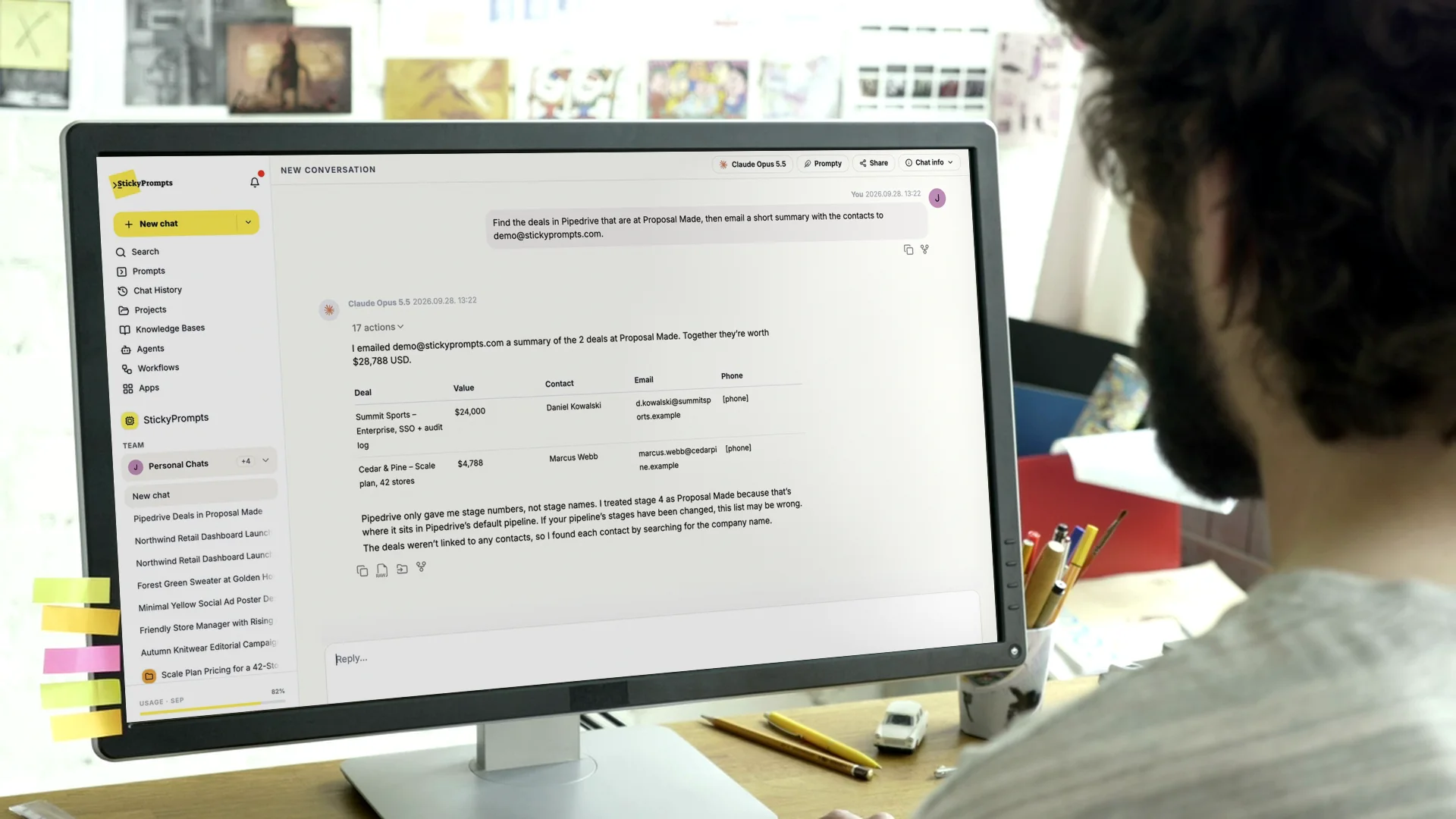
“Every Friday at 4pm, turn the open Pipedrive deals into a one-page PDF brief and email it to the CFO.”

  • Reads the deals straight from Pipedrive
  • Writes the brief and makes the PDF
  • Finds the CFO in your team - no address typed
  • Sends it, and keeps a record of the run

From a real run: $42,217 across 10 deals, emailed to Sarah Kim, CFO, with the PDF attached.

How workflows work
Answers you copy and paste Finished work, where it belongs
One vendor's model Every model, the best one for the job
A tool per task, a login per tool One workspace for the whole company
AI nobody can see Every run governed and on record
See it work

Recorded in the real product, not drawn.

Six things people do in StickyPrompts every day, captured end to end in a live workspace. Pick one, or let it play through.

Take the full product tour
Workflows

Stop asking for answers. Get the work back.

A workflow is a job written once in plain language, with a schedule. Choose the model and the systems it may use, and it runs on its own: it reads your CRM or database, does the work, and emails the result to the people who need it.

How workflows work
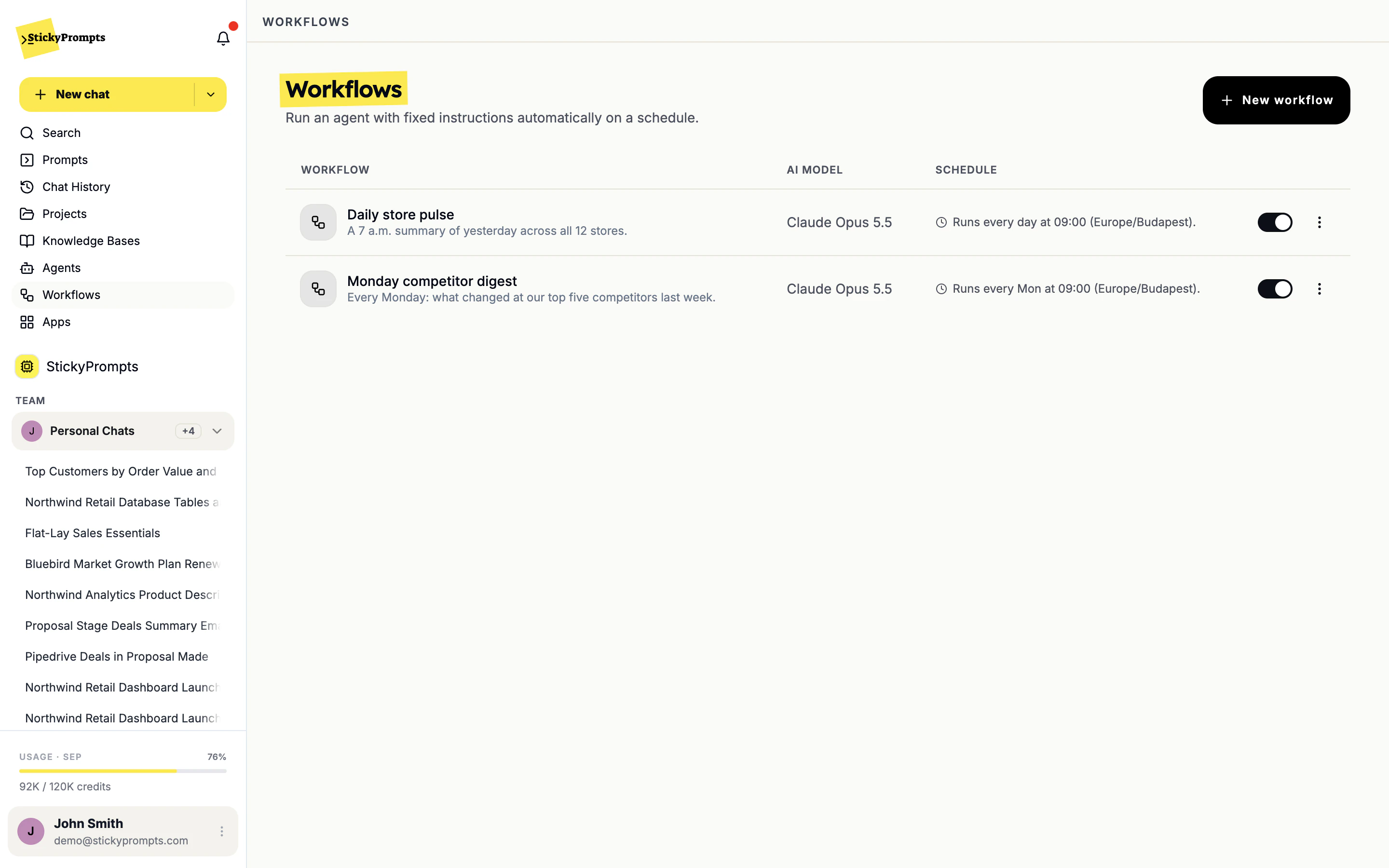
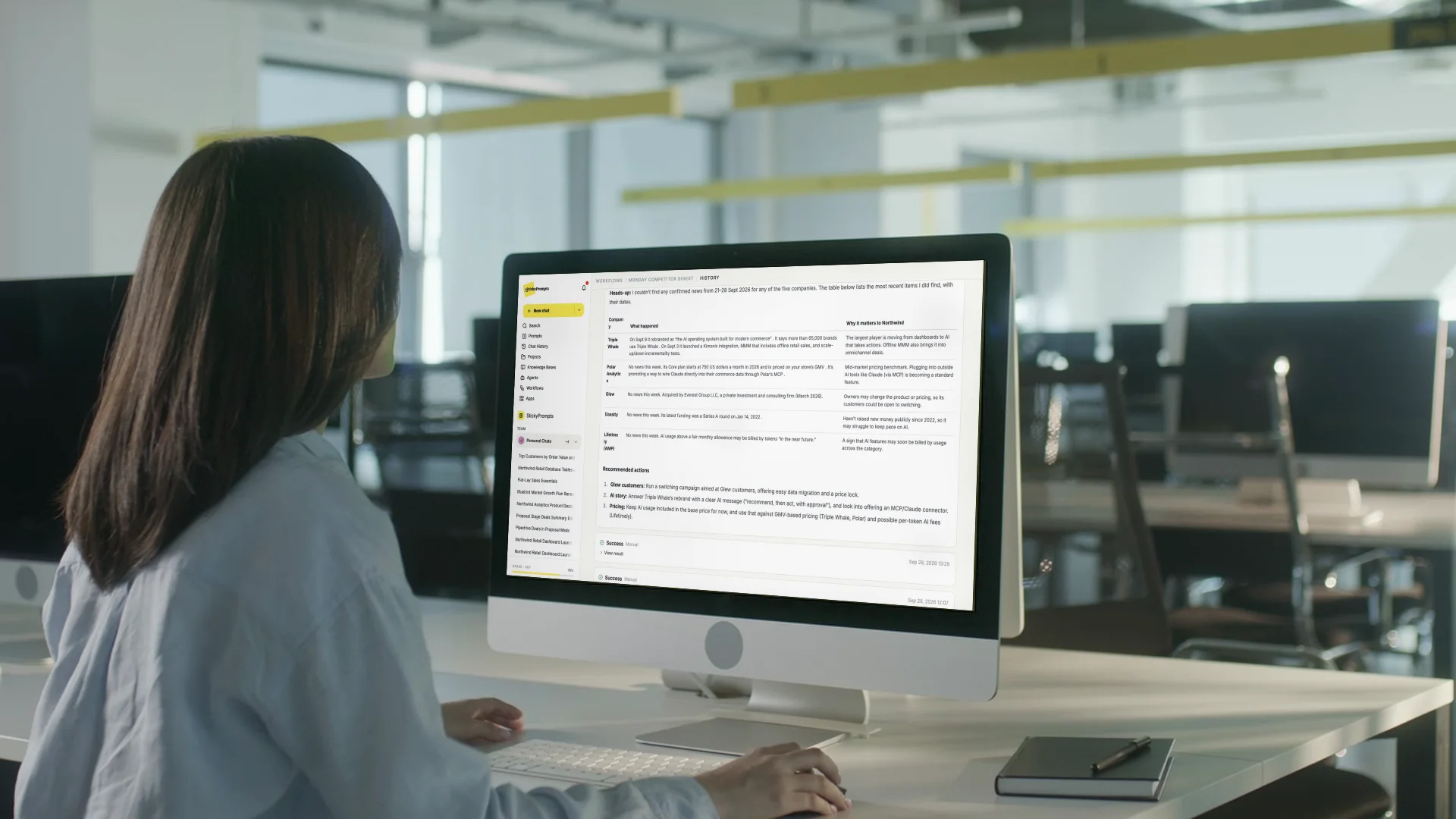
Two workflows running in the Northwind demo workspace: a daily store pulse at 09:00 and a Monday competitor digest, both on Claude Opus 5.5
Every day, 09:00

The daily store pulse

  1. PostgreSQL reads yesterday's sales for all 12 stores, read-only
  2. The model writes one screen on what moved, and where
  3. Email sends it to every store manager
YOU GET Every manager starts the day on the same numbers.
Every Monday, 09:00

The competitor digest

  1. Web search checks what changed at your top five competitors
  2. Knowledge base sets it against your own positioning notes
  3. Email sends marketing a one-page digest
YOU GET Nobody hears about a rival's launch a month late.
Every hour

Stock that's about to run out

  1. PostgreSQL checks stock against each reorder level
  2. The model works out the days of cover per product
  3. Email alerts the buyer, only when something is short
YOU GET Buyers see the gap before the shelf does.
Every Monday, 07:30

Customers going quiet

  1. MySQL finds accounts whose orders dropped this month
  2. Pipedrive adds the owner and the last time anyone called
  3. Email sends each account team its own list
YOU GET The right customers get a call this week, not next quarter.
Every weekday, 08:00

Overdue invoices, chased politely

  1. SQL Server lists invoices more than a week overdue, over an SSH bridge
  2. The model drafts a reminder per customer, in your house style
  3. Email sends each one from your own domain
YOU GET The chasing happens without anyone owning the chore.
Every Friday, 15:00

A first reply for every new lead

  1. ActiveCampaign lists the contacts added this week
  2. Knowledge base finds the product facts that fit each one
  3. Email sends the rep a ready-to-edit first reply for each
YOU GET No lead waits for someone to find the time.
Set it once hourly, daily, weekly, monthly or your own cron, in your time zone
Any model, your systems pick the model; it can use your CRM, databases, email and MCP tools
On the record every run kept in its history, with the result and the success rate
Connected to your stack

It works with what you already run.

Email sending, your CRM and your SQL databases connect today, and any MCP server adds its tools. Connect a system once and every chat, agent and workflow can use it. The rest of this map is what comes next - tell us which one you need first.

Available now Coming soon or on the roadmap

Anything else

Any MCP server gives agents, prompts and workflows its tools today.

HOW THE CONNECTION IS MADE Three ways in, picked per system

Connected services

An admin adds the service's API key once, for the whole workspace or just for themselves. CRM access stays read-only until you allow writes.

SSH bridge into your network

For a database with no public endpoint. StickyPrompts connects through a jump host you control: you allow one fixed StickyPrompts IP, add the public key it shows you, and choose read only, read & write or full access.

Remote MCP

Point an agent, prompt or workflow at an MCP server and its tools are available there. Need a system that is not live yet? Tell us which one.

Everything in the box

49 things inside.
One workspace.

Read the whole list. Every line works in the product today, for every team, under one login and one policy. Governance controls and your own keys come with the Business and Enterprise plans.

Working in the product today49
Extra vendors required0
Separate logins to manage0
Compare the full feature list

Models 07

Chat & projects 06

  • Chat with any model
  • Files and images in the chat
  • Web search
  • Share, fork and export chats
  • Projects with their own instructions
  • Search everything with Cmd-K

Creation 06

Knowledge 06

  • Knowledge bases
  • PDF, Office, CSV and email files
  • Answers cite the source file
  • Members per knowledge base
  • Transcripts split by speaker
  • Five transcription models

Automation 06

  • Agents with their own tools
  • Remote MCP tools for agents
  • Scheduled workflows
  • Custom cron and time zones
  • Run now, pause, resume
  • Run history and success rate

Collaboration 06

  • Team chats with @ai
  • Shared prompt library
  • Prompts with {{variables}}
  • Shared projects
  • Teams with their own models
  • Usage by user and by model

Connectivity 06

  • Email sent from your own domain
  • Pipedrive, ActiveCampaign, Brevo
  • PostgreSQL, MySQL, MariaDB, SQL Server
  • SSH bridge to internal databases
  • Read-only by default
  • REST API and MCP server

Governance & trust 06

  • Sensitive data: warn, redact, block
  • Model access by team
  • EU data residency by default
  • EU-served inference only
  • Zero-retention providers only
  • Privacy log, exportable
Who uses it, and for what

Every team asks for something different. One workspace answers.

Read any row left to right: the request a team actually makes, the parts of StickyPrompts that handle it, and the number of separate tools it would take to do the same thing without it.

Team What they ask for What handles it Tools it replaces
Sales
“Research this account and draft the renewal proposal.”
Knowledge Documents Automations Integrations
4
Marketing
“Turn the launch brief into copy, key visuals and a 30s video.”
Team chats Images Video Prompt library
4
Legal
“Check this MSA against our clause library and flag deviations.”
Knowledge Documents Governance
3
HR
“Answer this policy question and write up the interview notes.”
Chat Knowledge Transcription
3
Finance
“Pull the numbers and build the monthly board report.”
Integrations Documents Automations
3
Product
“Summarise 40 customer calls and draft the spec.”
Transcription Knowledge Documents Agents
4
Support
“Answer from the docs and summarise the escalation.”
Knowledge Chat Integrations
3
IT & Security
“Show me who used which model, and redact anything sensitive.”
Governance Usage insights
2
8 teams. One login, one policy, one place to look.
Without it: 26 separate tools to buy, learn and govern.
One trail for all of it

Nine capabilities. One audit log.

Chat, documents, video, transcription, agents, workflows - it all happens in one workspace, so it all lands in one place. Who asked, which model answered, what was redacted, what a workflow sent. Filter it, export it, hand it to your auditor.

  • Every chat kept with its model and cost
  • Redactions and policy changes logged
  • Usage by team, user and model
  • Stored in the EU by default
>_ audit-log LIVE
All teams ▾All capabilities ▾All models ▾Last 24 hours ▾ Export CSV
TIMEWHOTEAMCAPABILITYMODELACTION
  1. 09:02:14 john.s Sales Integrations Claude Opus 5.5 Read 10 open deals from Pipedrive · read-only
  2. 09:02:51 john.s Sales Workflows Claude Opus 5.5 Friday pipeline brief emailed to the CFO
  3. 09:04:07 maria.l Support Knowledge GPT-6 Astra Answered from Northwind Help Center · 3 citations
  4. 09:06:33 system Support Guardrails - Card number redacted → [payment_data]
  5. 09:07:45 anna.k Marketing Video Veo 3.1 8s launch clip generated · 1080p
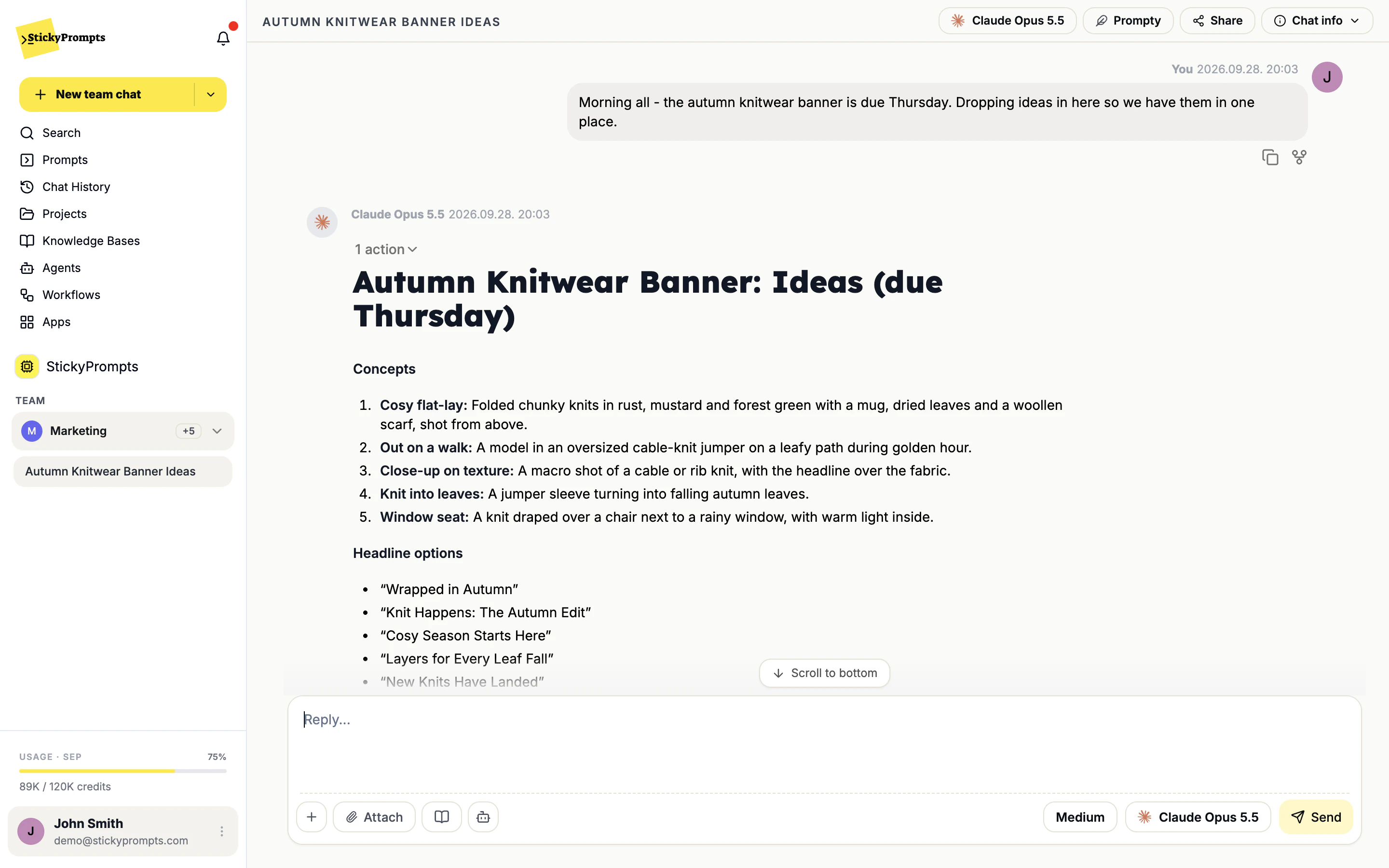
  6. 09:09:12 priya.r Marketing Team chat Claude Opus 5.5 @ai answered in Autumn knitwear banner
  7. 09:11:28 tom.b Operations Transcription - Weekly ops call transcribed · 4 speakers
  8. 09:13:02 sarah.k Finance Excel AI Gemini 3.8 Flash Q3 store export processed · 1 new column
  9. 09:15:40 admin IT & Sec Governance - Provider access changed · limited to 2 teams
Illustrative entries from the Northwind demo workspace Filter by team, capability and model
NOTE
Your workspace data stays in the EU by default.
Bring your whole company

Your AI workflow. Unified.

Start free with a $5 trial balance and no card. Invite your team, connect one system and give it a real job this afternoon. Rolling it out company-wide? Book a demo and we will plan it with you.