The meeting, minus the note-taking.
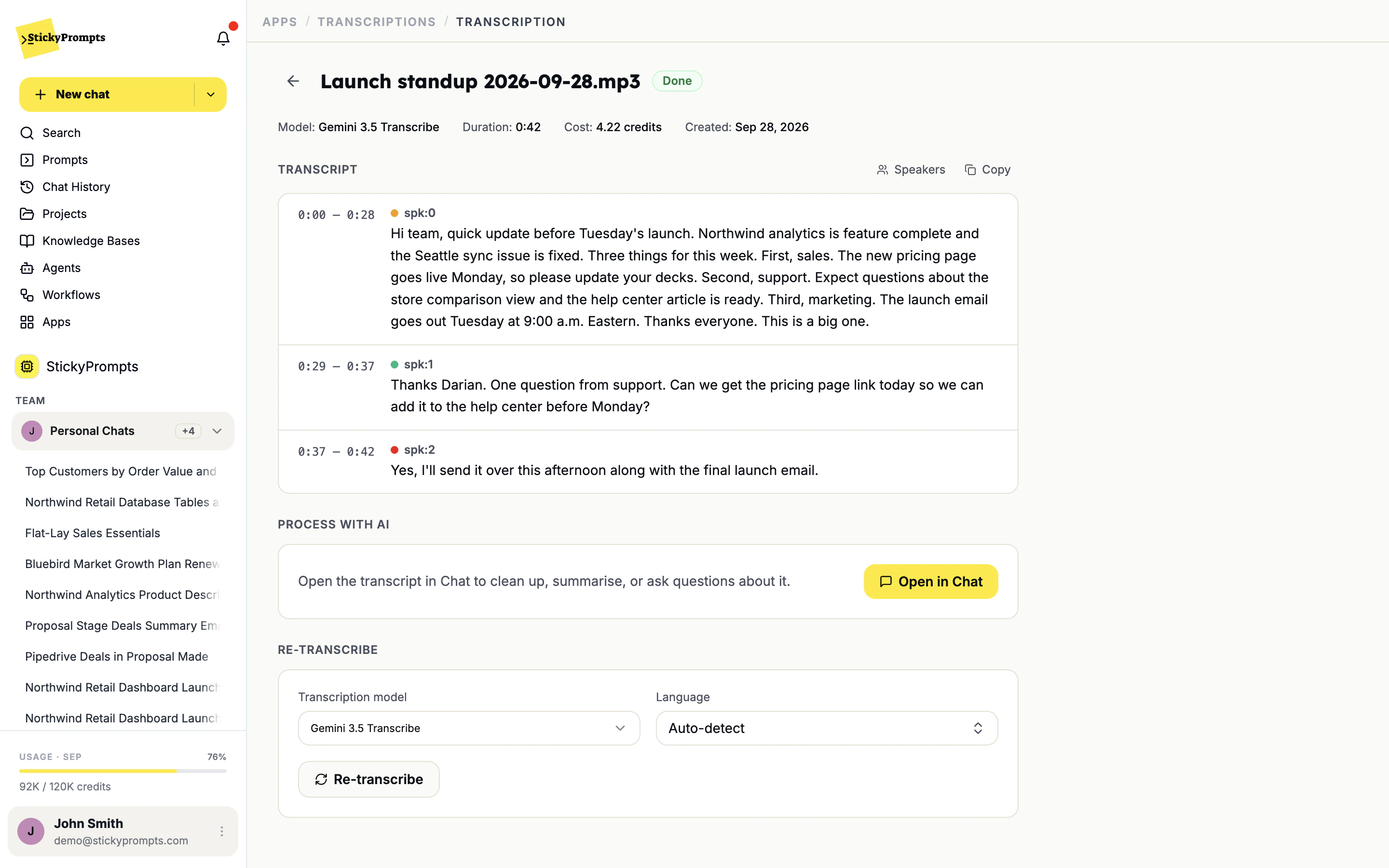
Drop in the recording. You get the transcript split by speaker with timestamps, and one click takes it into a chat where any model writes the minutes: what was decided, who owes what, and by when.
A record, not a wall of text.
Who said what and when, in a form you can check, correct and turn into something people will read a month later.
Speakers split, timestamps on, nothing to set up.
Upload a recording, audio or video, pick the transcription model and the language, or let it detect the language itself. The transcript comes back split by speaker with timestamps, ready to rename, copy or take into chat.
- MP3, WAV, M4A and more, plus MP4, MOV and WEBM video
- Models from ElevenLabs, Google and OpenAI to choose from
- Language on auto-detect, or set it yourself
Name the speakers. Fix what's off.
Rename spk:0, spk:1 and spk:2 to the people who actually spoke, and the change runs through the whole transcript. If a passage came out rough, re-transcribe with another model or a fixed language, and copy the result wherever it needs to go.
- Rename speakers once, everywhere
- Re-transcribe with a different model or language
- Model, duration and cost shown on every transcript
Open it in chat. Get the minutes.
Open in Chat gives the whole transcript to the model you choose. Ask for the minutes, the decisions, the open questions or the follow-up email. Save the format you like as a prompt, and every team writes minutes the same way.
- Open in Chat from any transcript
- Any chat model, from Claude Opus 5.5 to GPT-6 Sol
- Your minutes format, saved once as a prompt

- The new pricing page goes live on Monday.
- The launch email goes out Tuesday at 9:00 a.m. Eastern.
- Sales calls, turned into the follow-up email and the next step
- Customer interviews and research sessions, coded for themes
- Board and committee meetings, minuted in a fixed format
- Support calls, turned into a clear written reply
- Hiring interviews, written up against the same scorecard each time
- Workshops and all-hands, reduced to what changed
What teams ask about transcription.
Which files can I upload?
Audio and video: MP3, WAV, OGG, FLAC, AAC, M4A, OPUS, MP4, MOV, AVI, MKV and WEBM. Drop the file on the New transcript screen or browse for it.
Which transcription model should I pick?
You can choose ElevenLabs Scribe v2, Gemini 3.5 Transcribe, GPT 4o Transcribe Diarize, GPT 4o Transcribe and OpenAI Whisper. Larger models are more accurate but slower. If a transcript comes back rough, Re-transcribe runs it again with another model or a set language.
How do I get minutes and action items?
Click Open in Chat on the finished transcript and ask for them, with any chat model. Save the format your team likes as a prompt, with your own headings, and every set of minutes comes out the same way.
Can the summary go straight to our CRM or task tracker?
Not automatically yet. Filing a summary on the CRM record and pushing actions into your tracker as part of the transcription is on the roadmap. Today you copy the transcript or take it into chat.
What does a transcript cost?
It is measured in credits like everything else in the workspace, and each transcript shows its own cost, model and duration at the top.
Upload one recording and read the minutes.
Start free with a $5 trial balance. If the actions are right, the rest of the argument makes itself.